
Platform · RemoteDesk IT
RemoteDesk IT
Manage, secure and support every employee Mac and Windows PC.
RemoteDesk IT combines Apple-native device management, cross-platform device posture, remote IT support, privacy-aware work intelligence, and device lifecycle operations in one endpoint platform for distributed teams — one desktop agent, one management console. Macs enroll with Apple MDM; Windows PCs report through the same RemoteDesk Agent.
- One agent for Macs and Windows PCs, one cloud console for IT
- Device inventory, software, security and compliance in one place
- Read-only diagnostic bundles — no screen viewing, terminal or file access, by design
- Work activity, timeline, summaries and timesheets — privacy-aware by design
- Procurement, shipping, recovery, wipe and reassignment
One agent. One endpoint platform.
Stop stitching together device tools.
Managing a distributed team usually means combining device management, remote-control software, time tools, procurement vendors, and manual offboarding. RemoteDesk IT brings those workflows together around the employee and their device — the RemoteDesk Agent runs on the employee’s Mac or Windows PC, the RemoteDesk IT Console gives administrators one control plane, and both connect to the employment records the rest of the platform already holds.
RemoteDesk Agent — Mac & Windows
One cross-platform desktop agent. On the Mac it pairs with Apple MDM; on Windows it installs from a single MSI. It reports authorized, read-only device posture, keeps working offline, signs every check-in with its own device key, and always shows its state — the same experience on both platforms.
RemoteDesk IT Console — for administrators
Fleet-wide inventory, software and compliance visibility, policy management, audited diagnostics, approved work records, and the full device lifecycle — Macs and Windows PCs in one table, connected to RemoteDesk EOR, payroll and procurement.
Manage Devices
See every company Mac in one place.
Enroll Macs with Apple-native device management, track hardware and software inventory, and watch security posture from one console. RemoteDesk takes a least-privilege stance: by default it reads device health — it does not take control of the machine. Stronger device actions are opt-in, disclosed and audited, never on quietly.
- Apple MDM enrollment and inventory — model, serial, OS, last seen
- Employee-to-device assignment with full history
- Software inventory across the fleet; managed-app deployment where enabled
- FileVault encryption, firewall, SIP and OS posture — with the reason for each verdict
- Compliance baselines evaluated continuously, per platform
- Read-only by default; remote lock or wipe is an opt-in, disclosed capability
- Windows endpoints report the same read-only posture through the RemoteDesk Agent
Now on Windows
Windows PCs, the same read-only way.
Not every distributed team is all-Mac. Windows endpoints join the same console through the RemoteDesk Agent — one signed MSI that installs in a click and reports device posture, compliance and diagnostics. It does not use Windows MDM, remote control, or scripting; it holds the same read-only, privacy-first line as the Mac agent.
- One self-contained MSI — the agent and its query engine bundled; installs and starts as a service
- Read-only posture: OS version, BitLocker encryption, installed software, local accounts
- Continuous compliance — a Windows PC gets a real verdict from BitLocker and OS baseline
- The same on-demand read-only diagnostics as Mac — no screen, terminal or file access
- Every check-in signed with the device’s own key; never recovery keys or file contents
- Runs only the cloud-published, employee-visible query set — no ad-hoc queries
Support Employees Remotely
Diagnose the problem — without taking over the machine.
When an employee reports an issue, IT collects a read-only diagnostic snapshot — OS, disk, network, processes and security posture — with the employee’s consent. There is no screen viewing, no remote terminal, and no file access. RemoteDesk can help troubleshoot; it cannot control your device, watch your screen, or read your files.
- Read-only diagnostic bundles — a device health snapshot on demand
- No screen viewing, no remote terminal, no file access — by design
- System, process, network and security-posture fields
- Employee consents first; the exact query set is shown to them
- Every collection audited: who requested it, which device, when
Understand Work
Understand work, without turning work into surveillance.
RemoteDesk IT turns permitted desktop activity into an understandable record of the workday. Instead of relying on constant screenshots or invasive content capture, it uses work context — applications, window titles, domains, file names, time, and active/idle state — to build work sessions, timelines and summaries the employee reviews first.
My Day & Timeline
Automatic work-session understanding, a visual day timeline, and an editable daily work summary — raw activity stays distinct from approved records.
Timer, Automatic or Hybrid
Manual timers for billable work, fully automatic session understanding for internal teams, or both — missing-time detection catches what the timer missed.
Timesheets & Approvals
Work sessions become time entries with review, approval, export — and a connection to RemoteDesk payroll or client billing where configured.
Private Mode, app and site exclusions, and transparent capture settings are core controls — not afterthoughts.
From Hire to Recovery
The device follows the employee lifecycle.
RemoteDesk connects the device to the employment record. Procure equipment through Procurement & Supply, ship it to a new hire, enroll and configure it, support it during employment, and recover, inspect, wipe and reassign it when the employee leaves — the same documented device lifecycle RemoteDesk already runs.
Procure & ship
Order from inventory or partner channel; assign the serial before shipment.
Enroll & configure
Invite-based Apple MDM enrollment, policies, required software — ready by day one.
Manage & support
Inventory, compliance, read-only diagnostics and work records during employment.
Recover & reassign
Return, inspect, wipe on receipt — then back to inventory or the next hire.
Privacy by Design
Managed does not mean monitored — and we mean it technically.
Most tools ask you to trust that IT won’t overreach. RemoteDesk removes the capability instead: the product cannot see an employee’s screen, open a remote shell, or read their files. Device data, remote support and work records are three separate permission domains — holding one never grants the others.
- No remote screen viewing — the capability does not exist in the product
- No remote terminal and no file access
- Read-only device posture by default; control actions are opt-in and disclosed
- No keystroke, password, message-body, clipboard, camera or microphone capture
- Screenshots off by default and not required by the product
- Private Mode and app, site and folder exclusions
- Three separate permission domains — device, remote support, work data
- Every administrative action and diagnostic collection is audited
Product tour · wireframes v1.1
Inside RemoteDesk IT, screen by screen.
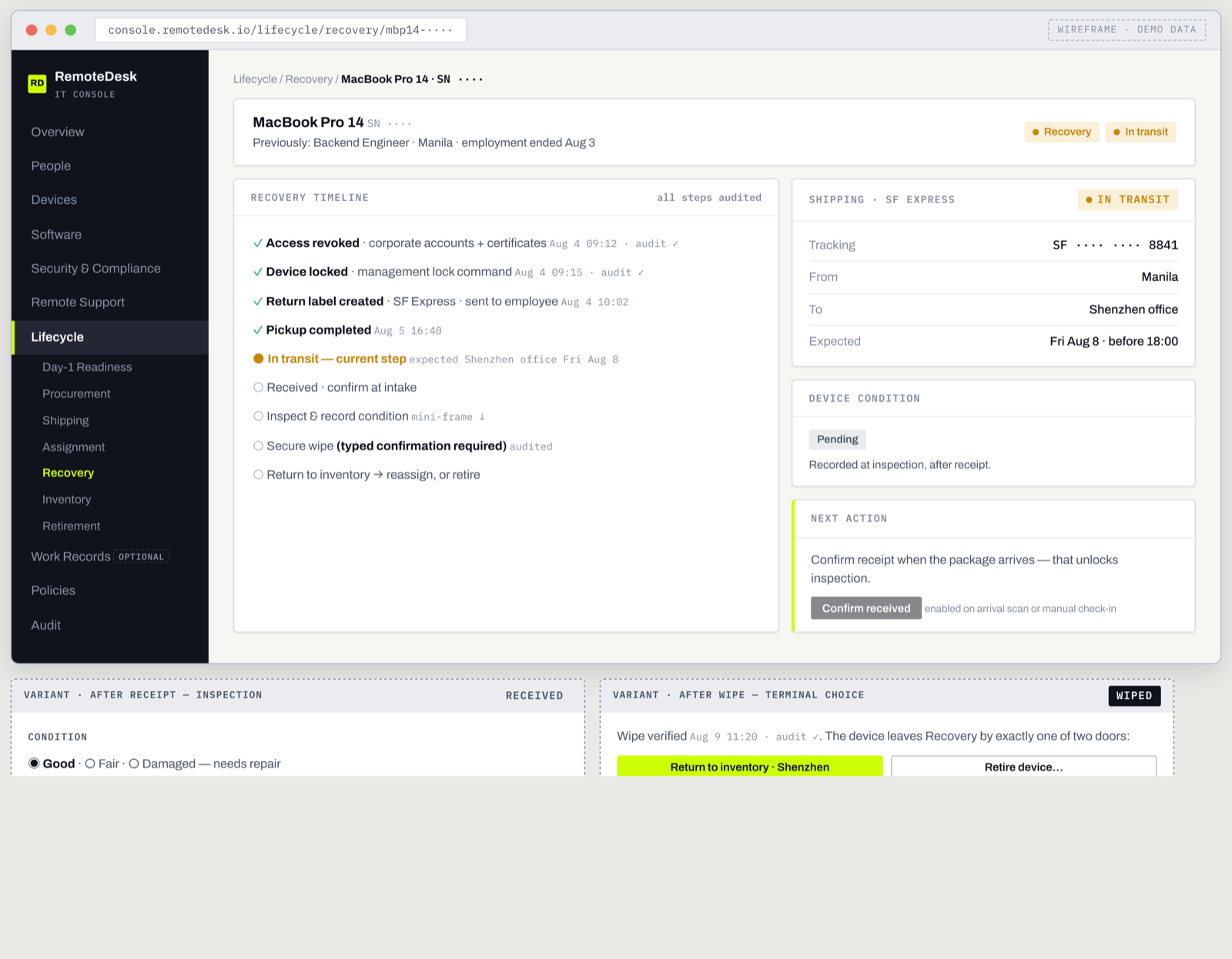
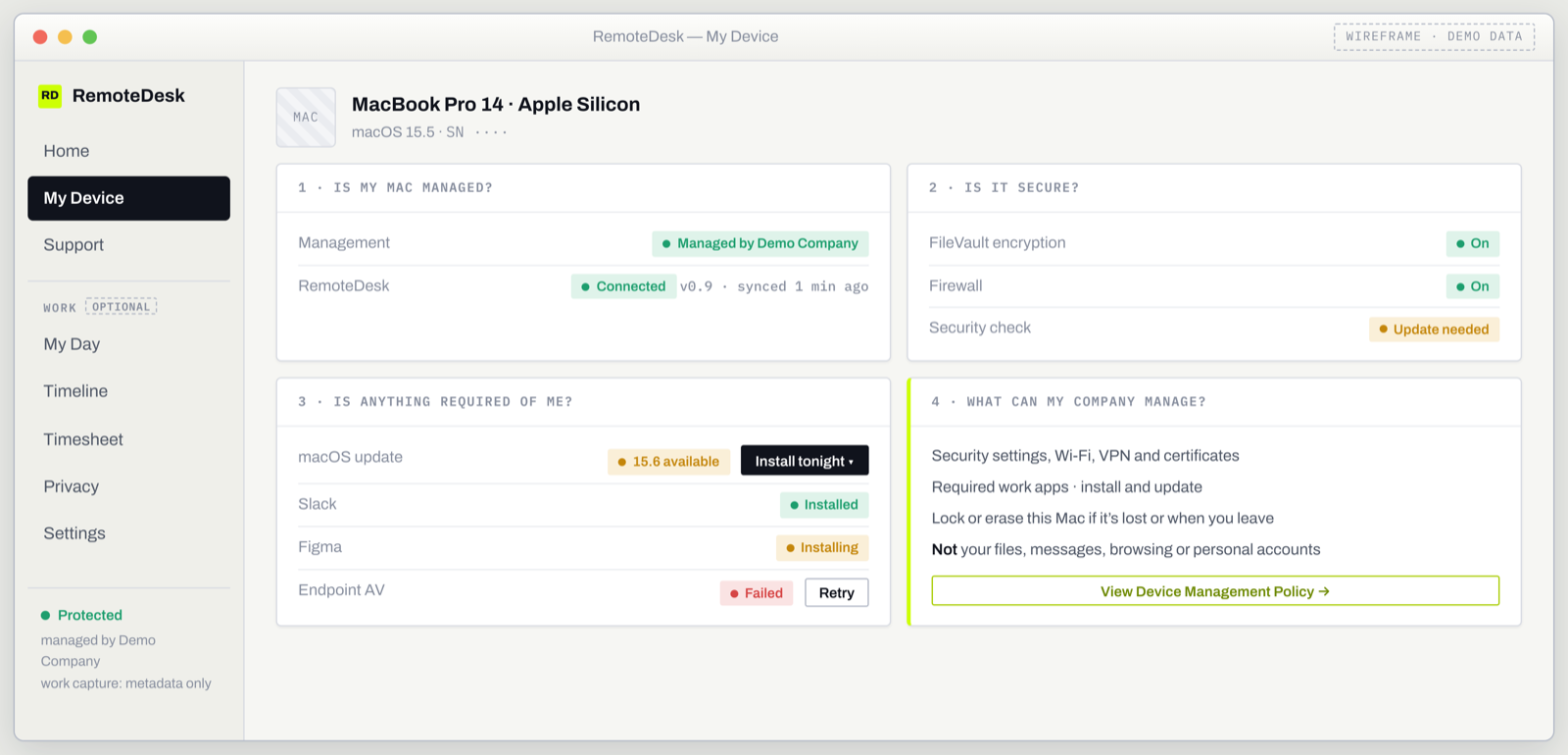
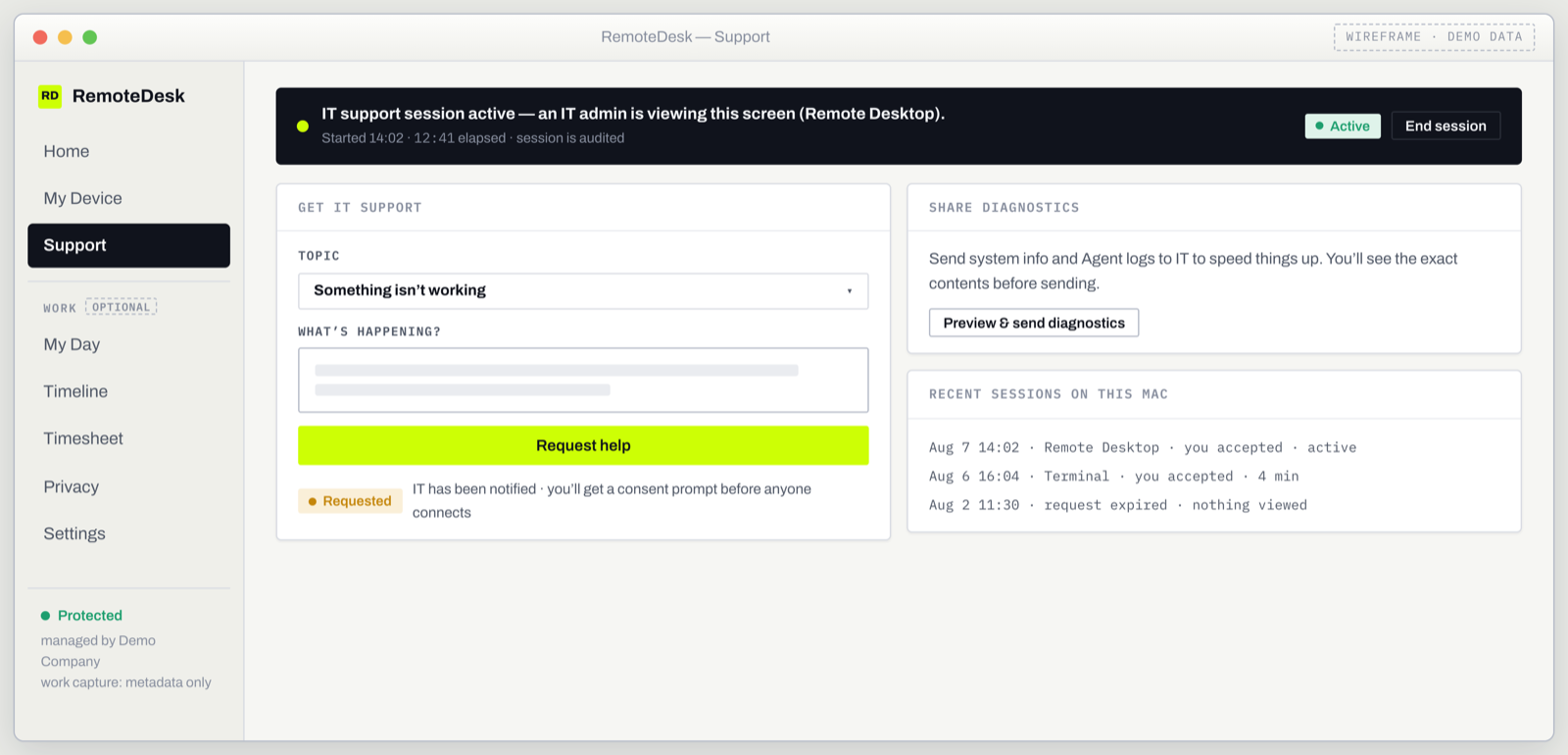
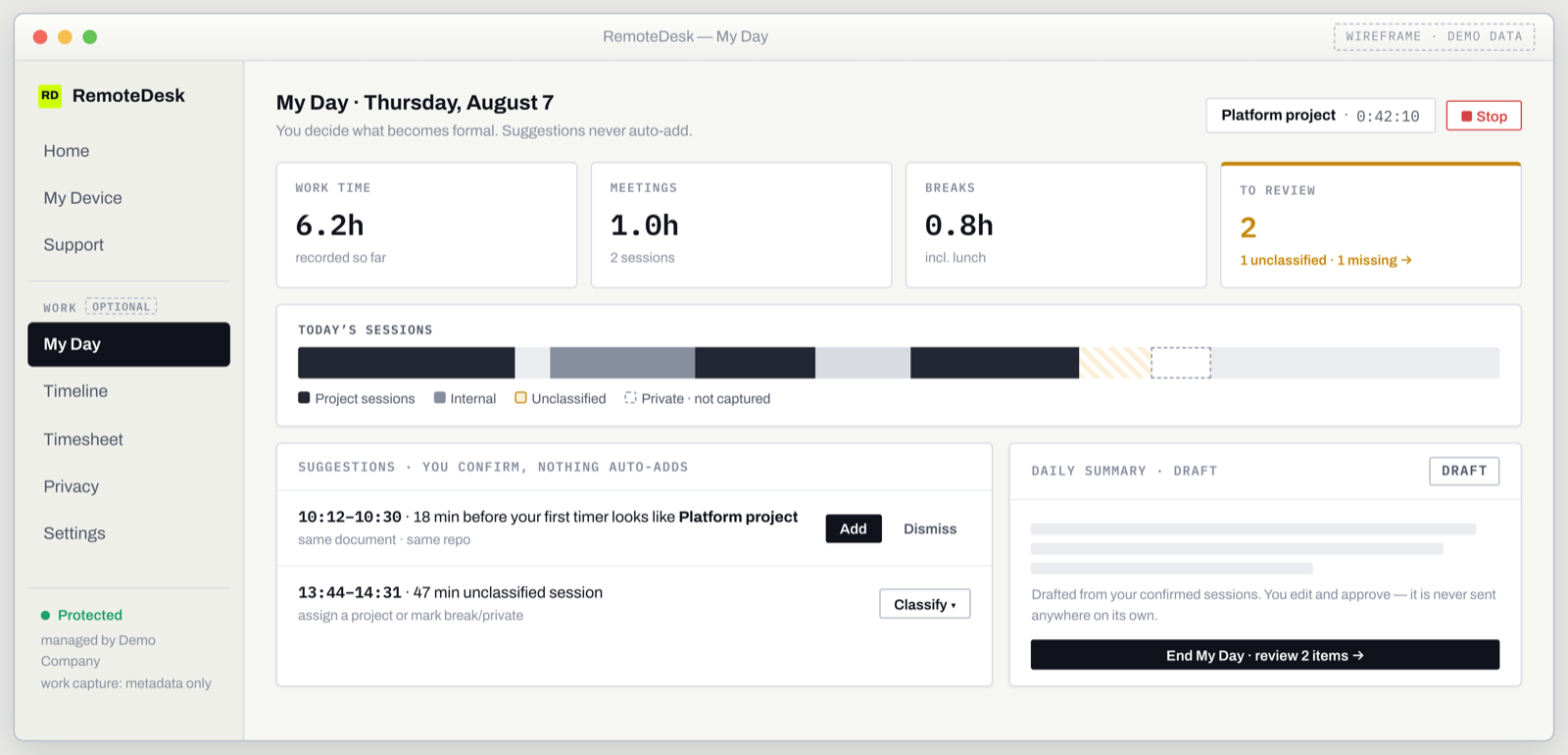
The product has two surfaces: the RemoteDesk IT Console — the cloud control plane administrators work in — and the RemoteDesk Agent — the app employees see on their Mac or Windows PC. The wireframes below show the V1.1 design with demo data; they are design documents, not final UI.
RemoteDesk IT Console — for administrators
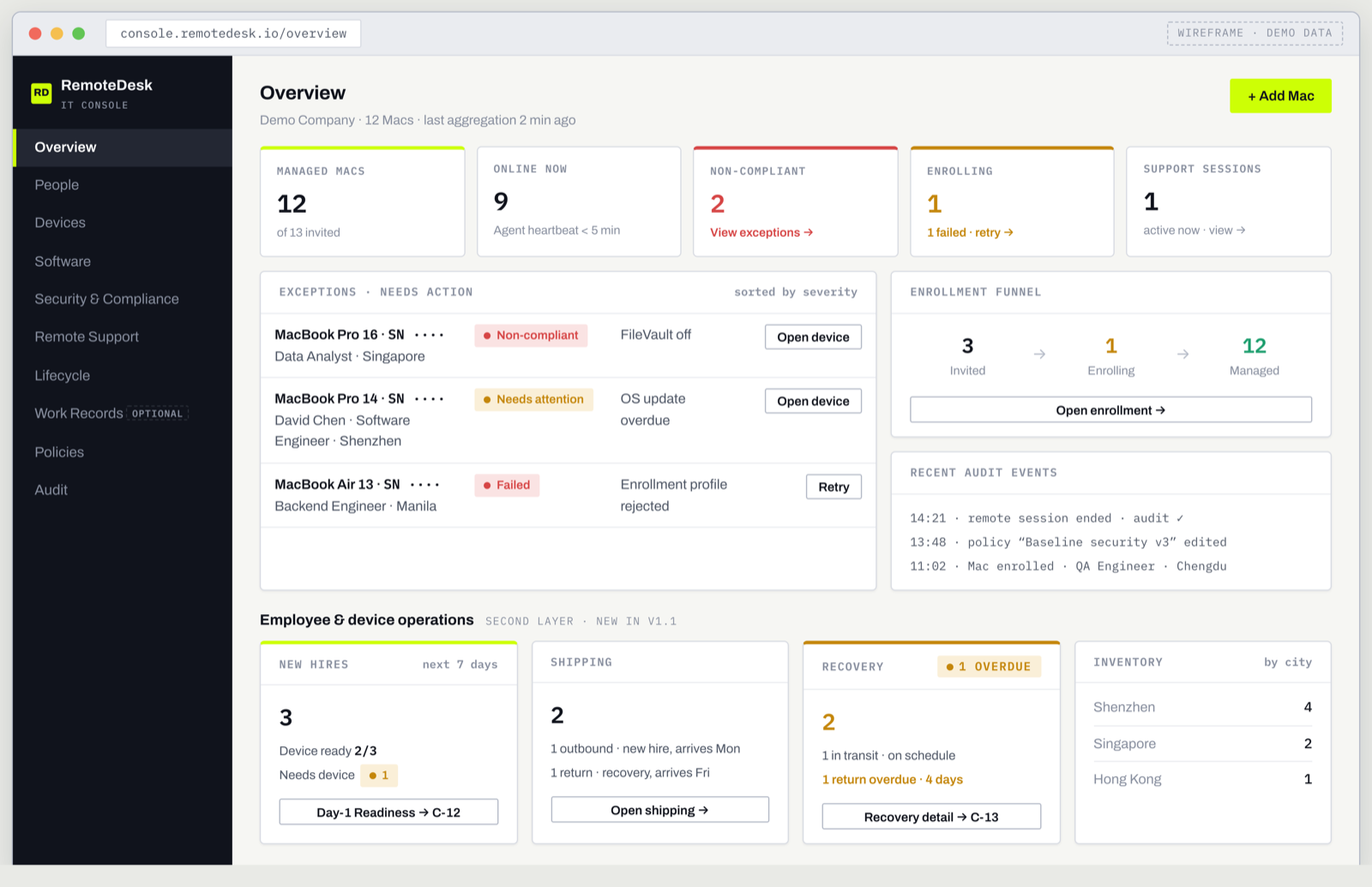
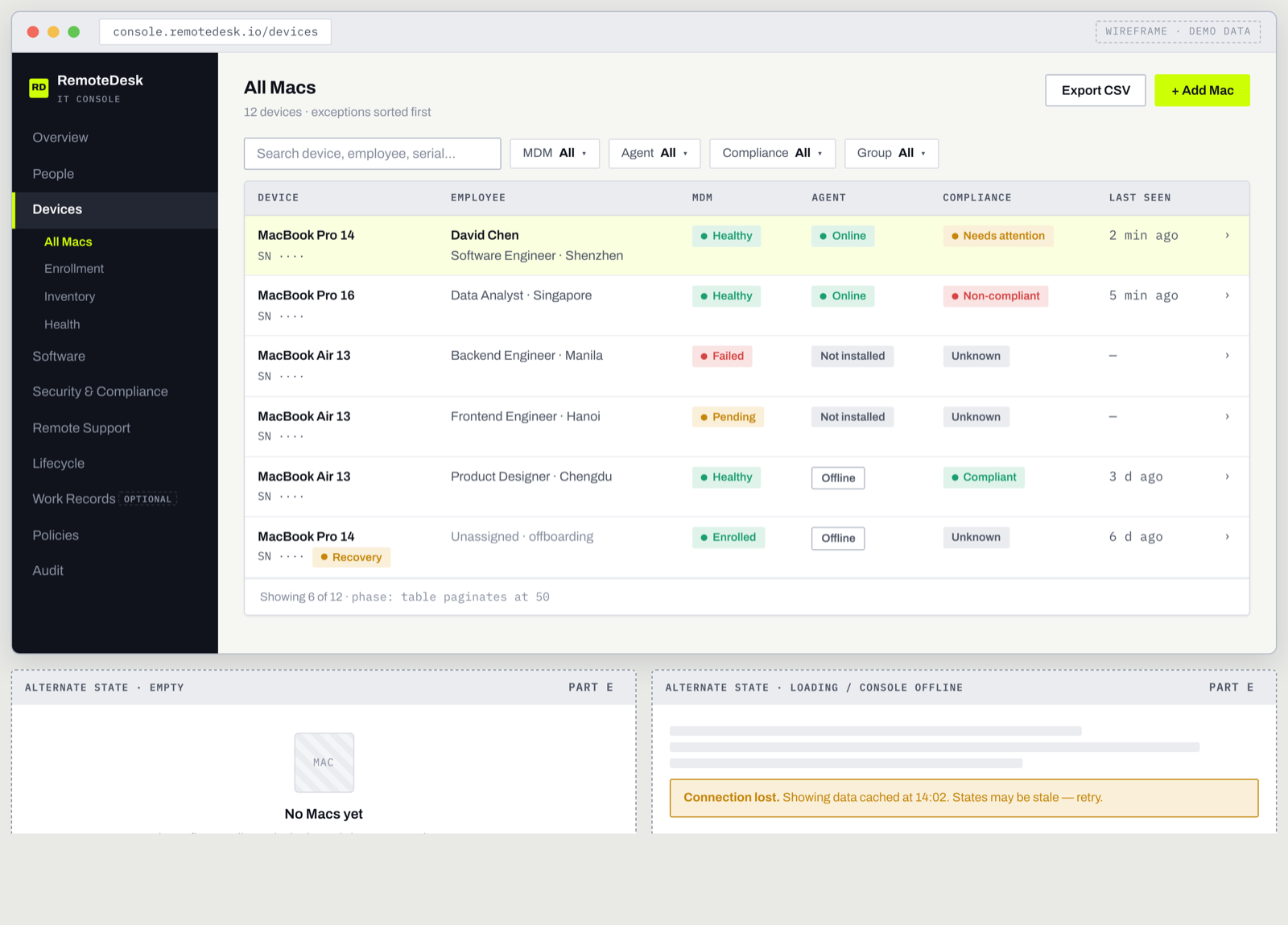
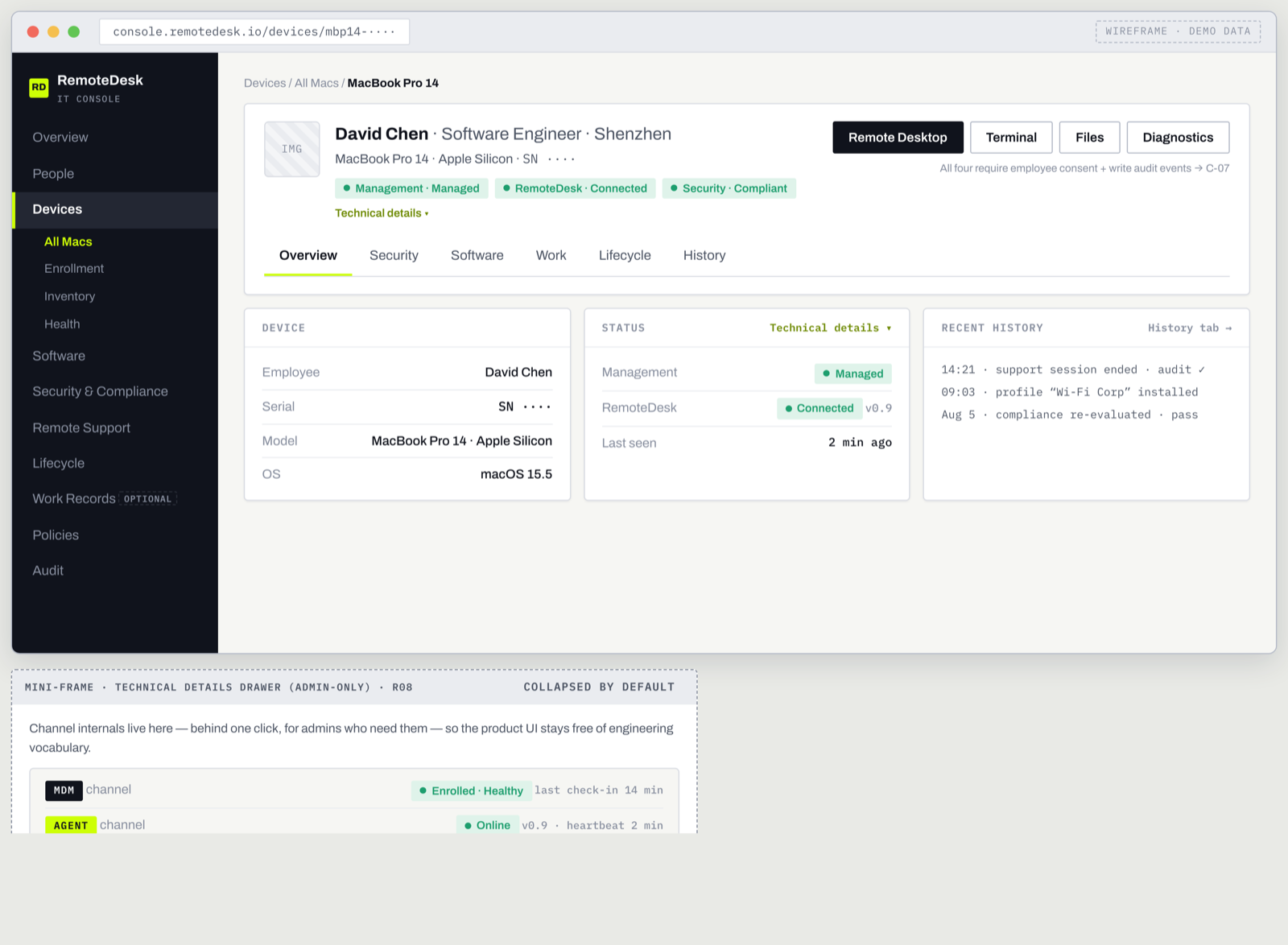
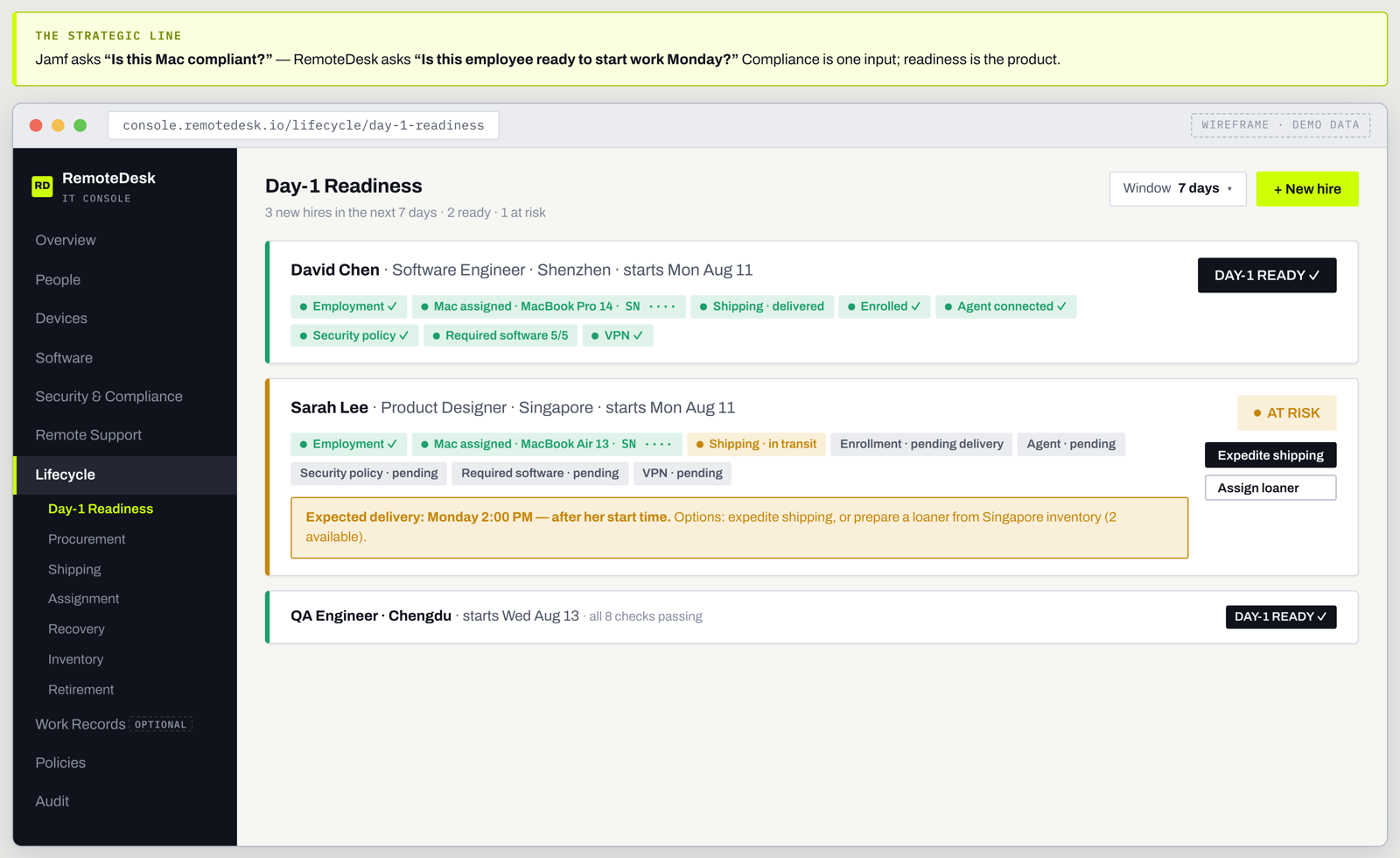
Everything IT operates lives in one console: fleet and people readiness, every device and its channels (Macs on Apple MDM + the RemoteDesk Agent, Windows PCs on the Agent), security posture, software, audited diagnostics, approved work records, and the employee-device lifecycle — down to day-one readiness and a recovery walked to the end.


RemoteDesk Agent — on the employee’s Mac or Windows PC
The employee side is a visible menu-bar (Mac) or tray (Windows) app, not a hidden service — one cross-platform experience from a single codebase. In V1.1 it is support-first: device readiness and IT help lead, while the Timer and work views appear only where the organization’s policy enables them. Privacy controls stay one click away throughout.




Behind both surfaces — one system
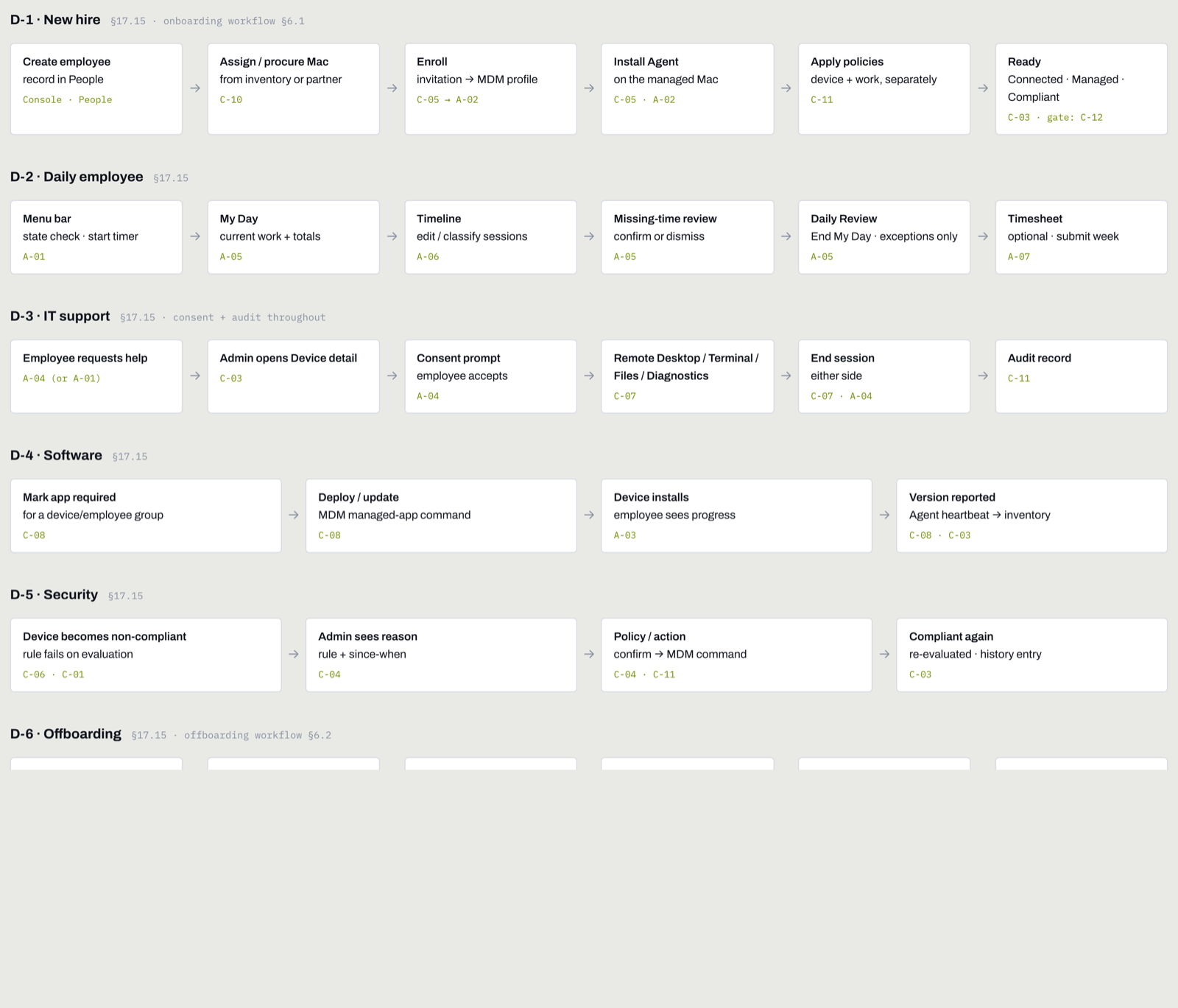
Both surfaces run on the same cloud backend and the same vocabulary: every device, MDM channel, agent, compliance verdict, support session, work session and lifecycle step is an explicit state — and the seven end-to-end flows below are designed to walk without dead ends.

Use cases
Built for distributed teams.
Global engineering teams
Ship and manage Macs, deploy tools, support remotely, and maintain a clear work record across cities and countries.
EOR customers
Connect employment, device assignment, remote IT, timesheets and offboarding in one workflow — the employee record and the device record stay linked.
Professional services
Timer or Hybrid mode, project and matter classification, narratives, approvals, and exportable timesheets for billable work.
Remote-first startups
Enterprise device operations without building an internal IT team.
Cross-border teams
Procurement, shipping, endpoint management, support and recovery combined across countries.
Payroll & billing teams
Approved timesheets and attendance flow into RemoteDesk Payroll or client billing as an input — never raw activity.
FAQ
Common questions.
Is RemoteDesk IT an MDM?
It includes Apple-native device-management and MDM capabilities, but the product is broader: endpoint management, remote support, work intelligence and device lifecycle are delivered together.
Which devices are supported?
Both Macs and Windows PCs are supported today. Macs enroll through Apple-native device management and the RemoteDesk Agent. Windows PCs install a single signed MSI (the agent and its query engine bundled) and report read-only posture — OS, BitLocker encryption, installed software, local accounts — plus compliance and on-demand diagnostics, without Windows MDM, remote control or scripting. Mobile-device management is not part of the current scope.
Can IT lock, wipe or take control of my device?
By default, no. RemoteDesk enrolls devices with read-only rights — it reads security posture and inventory, and cannot see your screen, open a remote shell, or read your files. Stronger actions such as remote lock or wipe are opt-in: an organization must enable them explicitly, and they are disclosed and audited — never on quietly.
Does RemoteDesk IT record everything employees do?
No. Work intelligence is metadata-first and privacy-aware. Keystrokes, passwords, message bodies, clipboard contents, camera and microphone are not part of the capture model; screenshots are off by default.
Can employees pause work recording?
Yes. Private Mode and app, site and folder exclusions are core controls, subject to transparent organization policy that is disclosed before permissions are requested.
Can IT remotely access a computer?
Remote support is a read-only diagnostic bundle only: administrators collect a device health snapshot (OS, disk, network, processes, security posture) with the employee’s consent. There is no remote screen viewing, no remote terminal, and no file access — by design. Every collection is consent-based and audited.
Can RemoteDesk IT create timesheets?
Yes. Automatic, Timer and Hybrid work modes create or support work sessions and time entries that can be reviewed, approved, submitted and exported — and connected to RemoteDesk payroll or client billing where configured.
How does this connect to EOR and payroll?
The same employee record can be linked to their device, approved work and timesheet records, procurement, payroll, and onboarding and offboarding workflows inside the RemoteDesk platform.

RemoteDesk IT
One platform for the employee and the device.
From onboarding a new hire to recovering their laptop at offboarding, RemoteDesk IT gives distributed teams a single way to manage, support and understand work.